Key Features
- Support device-based rate limitation and bandwidth control
- Compliant with IEEE802.3ah & ITU-T G.984.x standard
- Up to 20KM transmission distance
- Support data encryption, group broadcasting, port VLAN separation, etc.
- Support Dynamic Bandwidth Allocation (DBA)
- Support ONU auto-discovery/link detection/remote upgrade of software
- Support port VLAN configuration
- Support power-off alarm function, easy for link problem detection
- Support QoS configuration; port binding; port forwarding
- Support ACL to configure data packet filter flexibly
- Specialized design for system breakdown prevention to maintain stable system
- Support software online upgrading
- Support TR069 for ACS (Auto Config Server)
- Support PPPoE/DHCP Server/IPTV/NAT
Technical Parameter
| Item |
EW-F6021P |
| User Interface |
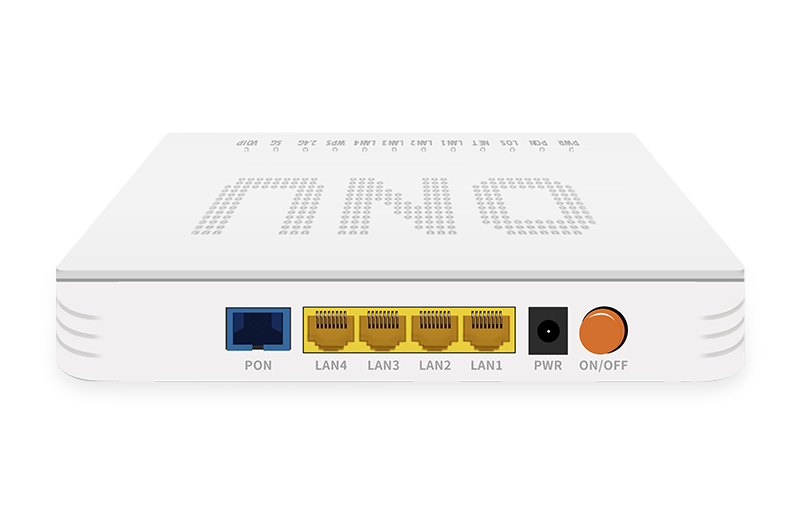
4*10/100/1000M RJ45 port |
| PON |
EPON&GPON mode adaptive; Interface Type: SC-UPC/SC-APC; Security: ONU authentication mechanism; Network coverage radius: 20KM; GPON: upstream 1.25Gbps/downstream 2.5Gbps, receive sensitivity -7dBm~-28dBm, continuous light power 0.5dBm~+5dBm; EPON: upstream 1.25Gbps/downstream 1.25Gbps, receive sensitivity -7dBm~-27dBm, continuous light power 0dBm~4dBm |
| Ethernet |
4*10/100/1000M auto-negotiation; Full/half duplex mode; RJ45 connector; Auto MDI/MDI-X; 100m distance |
| Size |
195mm(L)x135mm(W)x35mm(H) |
| Environment |
Operating: 0°C~60°C; Operating humidity: 10%~85% non-condensing; Storage: -40°C~80°C; Storage humidity: 5%~95% non-condensing |
| Power Supply |
12V 1.5A DC; power interface size: 2.1mm/5.5mm |
| Power |
<12W |
| Management |
Web/TELNET/TR069/OMCI/OAM |
Interface & Indicator Definitions
POWER: On = ONU powered on; Off = ONU powered off.
PON (ONU Register): On = successfully registered to OLT; Blinking = registering; Off = failed to register.
LOS (Optical Signals): On = optical link lower than receiver sensitivity; Off = optical normal.
LAN: On = Ethernet connection normal; Blinking = data transmitting; Off = connection not set up.
WPS: On = terminal connected; Blinking = connecting; Off = not connected.
NET: On = internet accessible; Off = internet not accessible.